Changelog (EN)

Version 9.4
Version 9.4 · New
SCADLIB: TAB-carrousel
Hold TAB during an insert from SCADLIB to flip through the other blocks on the same page with the mouse wheel or arrow keys. The block under the cursor swaps live. Release TAB to keep the block shown, or press ESC for the original block. The picked block is highlighted in the library. With the ‘Carousel: all pages’ option in the SCADLIB settings you flip through all pages instead of only the current one.
SOLIDUNFOLD / SOLIDFOLD
SOLIDUNFOLD unfolds 3D solids into 2D polylines and stores the original 3D coordinates. SOLIDFOLD folds them back into a 3D solid. The result can be placed interactively.
FLATTENSOLID
Projects 3D solids to 2D geometry on the XY plane (Z=0). The solid is exploded into regions, projected, and converted to lines and arcs. Duplicates are automatically removed.
FACEUNFOLD
Flattens a curved face of a solid or surface into a 2D outline.
SCEXTRUDE
Extrudes 2D curves into 3D solids. Automatically uses the curve normal as extrusion direction. Supports preselection (multiple curves at once), remembers the last used direction and distance, and offers axis snapping (X/Y/Z) when using two-point input.
FACETOPOLY3D
Select a face from a 3D solid and convert it to a 3D polyline. Uses boolean operations to extract the surface. The result can be placed interactively with a configurable offset.
SCMIRROR
New mirror command with live preview. Ortho (F8) or Shift keeps the mirror line straight; the original stays in place. Blocks are rotated cleanly instead of being flipped ‘inside-out’. Place a POINT on layer 900-MIRR_POINT inside a block to choose the pivot yourself. Objects on locked layers are skipped and the count is reported.
SCSCATTER
Fills a closed polyline with copies of the selection. Choose random placement without overlap (or with Allow overlap), or a grid (XY array) with fixed spacing, offset and angle. A live preview shows the result before you place it.
INFRAPATCH
Patch the infrastructure by clicking: pick a power distro, power BOB, Veam BOB or DMX node, then click the blocks that connect to it. Names and channel numbers are written into the attributes, and the load per BOB channel is checked. Replaces POWERPATCHASSIGN (that name still works).
CABLESYNCALL
Synchronizes and updates all cables in the drawing at once. Also works with MLeaders.
STREETVIEW (experimental)
Opens a Street View window. Click points in the drawing to navigate to the corresponding location. Stays active until ESC. Only works in a drawing with RD coordinates.
SCADLIB: Insert Align
New option in the SCADLIB right-click menu. Inserts a block with magnetic edge snapping to existing blocks. Snaps to the N/E/S/W edges of a block (taking block rotation into account). After placement, the placed block becomes the new target for the next insertion.
CA (COPYALIGN)
Copies the selection with magnetic edge snapping to existing blocks, just like Insert Align. Takes over the rotation of the target block; Rotate adds extra rotation, Nul resets it. Keeps copying until ESC; each placed copy becomes the new target. Enter repeats the last option. Also works correctly in a rotated UCS.
KEYPLAN
Use in paperspace. Creates a small overview viewport in the upper-left corner showing the full model. A red rectangle indicates which part the main viewport displays. Automatically locked.
THAWLAYERALLVIEWPORTS
Thaws a chosen layer across all viewports at once.
CREATELAYOUT
Creates new layouts with model space rectangles using an interactive jig.
LAYOUTOVERVIEW
Creates an overview drawing showing viewport rectangles from other layouts on the current layout. Per-viewport selection dialog, interactive destination picking, and a sync option to refresh the overview.
EXPORTGEOJSON
Exports drawing entities to GeoJSON format with optional filtering by type and selection.
IMPORTKML
Imports KML data into the drawing, for example from Google Earth.
SCADDATTRIBUTES
Adds attribute definitions to selected block references so existing blocks can be extended afterwards.
COUNTPL
Select a polyline as boundary. All blocks inside the polyline are automatically counted via Countlist without selecting the blocks separately.
SCREPLACE
New replace command with a full window for replacing blocks. REPLACE is now the fast command that uses the same settings without a window.
MERGEBLOCKS
Merges block definitions based on an attribute value (default ‘Short_Name’). Blocks with the same value are merged into one definition and renamed to that attribute value. Attributes are removed after the merge.
SUBENTCOLORTO
Converts the colors of the objects inside all blocks in model space (including nested blocks and attributes) to ‘ByLayer’ or ‘ByBlock’ in one go. No need to explode the block. Useful for keeping colors clean and consistent in a drawing.
DMXAUTOINSERT / DMXAUTOINSERTRECURSIVE
Pairs selected fixture blocks with a Spot-Info fixture per block type; fixtures that are already linked are skipped. Also available as DMXINSERTAUTO. DMXAUTOINSERTRECURSIVE searches the whole drawing, including fixtures inside nested blocks, places DMX blocks there, and on a rerun only fills the missing positions.
GDTFLINK
Links fixture blocks to GDTF files, local or from GDTF Share (with your GDTF Share account). Places the DMX blocks and records the GDTF mode. The links live in the Database folder and are therefore shared; edit existing links via Edit pairings.
GLBEXPORT / GLBEXPORTBLOCK
Exports 3D geometry to the GLB format. GLBEXPORT writes the drawing; GLBEXPORTBLOCK creates separate GLB files for selected block definitions, including a placement file.
SCZOOMCYCLE
Steps through selected objects and zooms to each one. The original selection remains intact. Also available as ZOOMCYCLE.
REMOVEDOUBLEREGIONS
Finds duplicate regions, keeps one copy, and removes the remaining duplicates.
CREATESECTIONVPORTSAUTOZ / REFRESHSECTIONS
Creates Z sections automatically. REFRESHSECTIONS updates all existing section viewports at once.
MODELCHECKINTERFERE
Checks 3D solids for clashes using the rules from the Modelcheck settings. The Ignored Sub Blocks column lets you leave sub-blocks (and their contents) out of the check per rule.
ZOOMTOZONE
Prompts for a zone number and zooms directly to its associated zone polyline.
CABLEAPPLYDEFAULTS
Applies the default cable lengths to selected cables.
AUTOCABLELEADER / CABLESNOLEADER
CABLESNOLEADER lists cables without leaders and zooms to the selected cable. AUTOCABLELEADER automatically adds missing leaders.
SCUCS2WCS / UCS2WCS
Converts the current UCS to world coordinates. The geometry and view are transformed together, so the drawing keeps the same appearance.
GPSXYSETTINGS
Opens the settings for GPSXYLIST and GPSXYLISTBYLAYER. Choose a column preset, header row, delimiter, and decimal precision, with an immediate output preview.
SCPUBLISHPDF
An alternative to PUBLISH that creates smaller PDF files, working around a bug in PUBLISH. Publishes selected layouts to one compressed PDF with bookmarks, configurable image quality, and background publishing.
SCTEXT
One window for placing labels, click-to-number, and numbered incrementing of text and attributes, with a live preview. Ordering can be spatial or along a picked line. The X, Y, and Z axes can be dragged into the order you want, so you decide which axis is sorted on first.
Version 9.4 · Improvements
POWERPATCH: Now supports undo and highlights the blocks changed by the patch.- SCBEdit:
BESAVEand BEUPDATE no longer create an extra autosave that clears the parent drawing’s undo history. Event handlers are detached when the last block-editor drawing closes. - Splash & info windows: More stable on close — no more freezes when shutting down BricsCAD.
SCADLIB— window position: Position and size now restore correctly when toggling between minimized and normal, and on multi-monitor setups. Windows that would land off-screen snap back to the primary display.SCADLIB— speed: Windows open faster and the menu loads in the background, so there is less waiting.LAYHERDECKCSV: Generated Layher blocks are automatically placed on the layer configured for that block inSCADLIB.SCADLIB— InsertIncrement: New right-click menu option. Pick an attribute, prefix/suffix, start value and step; each subsequent insert auto-increments that attribute value.- Cadbase: Library loading now runs in the background without freezing BricsCAD, and concurrent loads are handled neatly in sequence.
LIBMANAGER: Many improvements: drag & drop reordering, adding sub-items, batch editing for quick icon generation, delete buttons for pages, faster display, and better path handling for library sources and location dialogs. New items, duplicates and folders are placed directly below the row they belong to instead of at the end. Also: top tabs, a tree filter, and undo for add, remove and rename.- Library Update: The file list is built faster, making the overview available sooner.
- Bridle Module: New BridleManager window with real-time force calculation, recalculation, height validation, location and supplier filters, bridle-name suggestions, steel weight in exports, and sorting. COPYBRIDLEPROPS recalculates the target height after copying; MIRRORBRIDLE lets you define the mirror line by angle. BMGR opens the manager.
COUNTLIST: Sorting now also works correctly for attribute, visibility-state, and parameter columns. Active category filters and the totals row remain intact after sorting. Switching attribute and parameter columns rebuilds the table faster.- DMX Insert: The window opens centered on SCAD.
Fixturesearch supports multiple search terms and shows up to 30 matching fixtures. CustomDMXINSERTdata is preserved as attributes so names carry through to the Excel export. DMXAUTOPLACELINK: Also available as DMXINSERTAUTO. Selected blocks are paired with a Spot-Info fixture per block type. Fixtures that are already linked are skipped. Dynamic block name resolution was fixed.DMXUNLINK: New command that removes the DMX link from selected fixture blocks so they can be linked again. Existing DMX blocks are kept.- DMX Channel Assignment: Per-channel wattage limits and improved undo.
- MVR Import/Export: Import now uses the correct units. Export also includes 3D solids, meshes, surfaces, 3D faces, and nested blocks.
- SelectSimilar: Added a tolerance setting for more accurate selection.
SELECTINSIDEPOLYLINE: Improved preselection and disabled group selection during selection.- Selection Filter: Selecting locked layers and xrefs is now faster and remains active correctly after
BESAVE. SCRENAMELAYERS: Wildcards (such as * and ?) are now supported so multiple layers can be renamed at once.- Ignore Layer Rule: The xref name is now removed from the layer when applying the rule.
- SC
Blockeditor: Hatch draw order from blocks is now preserved in the block editor. NUKE: Processes nested blocks faster while leaving blocks from CADBASE intact.RBCLEAN:MTEXTobjects are now included when resetting rotations.SCDIVIDE&SCDISTRIBUTE: The windows were refreshed.EDITDATABASE: Bulk adding of blocks and improved scrolling.SETRANG: Block/unblock works with one click when a locked attribute is missing. Dropdowns stay open until a choice is made.- Copy/Move: Blocks retain the correct rotation when copied or moved to a snap point.
- MyMove: The live preview no longer flickers when Dynamic Input (DYN) is disabled.
CABLECLI: Now works correctly in a rotated UCS.- CablePlaceText: Added an option to keep text and leaders in place.
- MLeader: Text height now automatically follows the MLeaderStyle height.
- HatchAreaField: Improved text placement and added a settings window.
- Nextpoint: Cycling continues to work when the command line is empty, and the remembered point resets when a new command starts.
CREATELAYOUT: Smoother paperspace zoom and settings are now remembered.CREATESECTIONVPORTS: Z sections are sorted by height, Y sections are mirrored correctly, the section label and layout prefix are configurable, and the X-section list is reversed.- Zone Export: Dynamic block zone detection and the zone name on every printed page.
EXPORTKML: Hatches and blocks are now included in the export.SCGEO: CityJSON import now accounts for the drawing units.- Advanced CSV Export: Exports one CSV or splits output by zone and/or post. Xrefs can be excluded and attribute columns can be combined.
- ExportToTemplate: Zone export only runs when the checkbox is enabled, and the export now includes a totals row.
- Template Export: New Excel export window and a simplified legend menu when placing in paperspace.
CURVEARRAY: Works correctly in a rotated UCS, respects the minimum width, and no longer loads large numbers of objects unnecessarily.RELXREF: No longer requires a selection and now also works with unloaded files.- QuickSettings: Redesigned window with extra nextpoint settings.
CNTSV2: Now also works with .xlsm templates, fills the header row from DWGPROPS, and hiding columns can be undone again.SCADLIB— blocks containing Civil objects: Blocks containing BricsCAD Civil objects are refused on insert. Such blocks crashed BricsCAD as soon as an insert of them was erased; use the standardINSERTcommand in that case.COUNTLIST— switching drawings: The window stays open when you switch drawings and follows the active one.SCREPLACE: Replacing with a block of the same name works again, and picked attribute values are copied along.UNDO: Fixed a rare case where a singleUNDOreverted several edits at once.- Mid between two points (M2P): Fixed a bug where, during inserts from
SCADLIB(including magnet blocks) and in Copy/Move, the block landed on the last click instead of on the midpoint; a typed coordinate is also honoured for magnet blocks. - Section (
INSERTSECTION): New settings for the layer of the section texts and for whether the section symbols of the other sections are placed in each viewport. - Update check: The old update method has been removed and replaced with a new one.
MATERIALMAP: AUTOSNAP and OSMODE are restored after the command.SCIAEXPORT: Beam properties can come from a blocklist (a row can also target one colour inside a block), hinges come from the template, and the blocklist is merged into one combined mathlist. A missing Layer column is added, blank lines are removed from the template, and the export stops with a message when a cross-section is missing from the XML template.
Version 9.3
Version 9.3 · New
GDTF Import:
Import GDTF (General Device Type Format) fixture files straight into the drawing. Supports mesh geometry, block creation and fixture configuration from the standard GDTF format.
COORDINATELEADER:
Places leaders with X/Y coordinates. Choose between a point or a block, with an automatic reactor for dynamic updates. Settings are remembered.
SWEPTPATH (Experimental):
Vehicle turning-circle analysis with animation. Simulates the path of a vehicle, including the trailer pivoting around the tow hitch. Useful for checking clearance widths.
POWERPATCH:
Command for power patching configuration.
SETTEXTSTYLE:
Sets the active text style with a command.
SCINSERTDWGPATH:
Inserts a DWG from a path, with support for Windows environment variables (e.g. %USERPROFILE%).
SYNCSCADLIB:
SCAD now supports incremental downloads of individual files, so you no longer need to reinstall the full library. SCADLIB shows a banner when updates are available. An overview lists the files that are new, will be updated or will be removed.
INSERTSCAFF & SCAFFLIB:
Quickly insert scaffolding material by clicking 2 rosette points. SCAD Re-Event checks which ledger or brace fits in between. If there are multiple options, press Tab to switch between the available blocks. SCAFFLIB fills the list of items that INSERTSCAFF searches; this must be a block containing the ledgers and braces.
COPYATTRIBUTESMULTIPLE:
Same as COPYATTRIBUTES, but copies the attribute values of the source block to multiple selected blocks.
LOCKALLVIEWPORTS / UNLOCKALLVIEWPORTS:
Changes the ‘Display Locked’ property of all viewports at once.
REPLACEV2:
Same functionality as REPLACE with a few small changes. It will eventually replace the old REPLACE.
REPLACEKEEPATTRIBUTES:
Same as REPLACE/REPLACEV2, but keeps the (matching) attribute values of the old block.
REPLACEGLOBALKEEPATTRIBUTES:
Same as REPLACEGLOBAL, but keeps the (matching) attribute values of the old blocks.
CXYZ:
Asks for 2 points and uses the X, Y and Z distance to copy the block.
NUKE:
Explodes all blocks down to the second-lowest level, so only blocks of the lowest level remain.
CQ (Experimental):
New way of copying that is much faster in most scenarios, but still has some bugs when the viewport is rotated or zoomed while dragging.
ATTTOPLAN:
Makes attributes readable from the top view, regardless of the rotation of the block they belong to.
CHANGEPOLYLINESTART:
Changes the start point of an existing polyline. It is best suited for closed polylines, but open polylines are supported too.
DMXSETID:
Automatic DMX fixture ID assignment with flexible numbering modes (selection order, horizontal, vertical). Replaces the old LISP version.
COUNTLISTATT:
Countlist with attribute override mode. Attribute values override CADBASE values. Blocks are grouped based on these values.
DMXAUTOPLACELINK:
Smart batch DMX fixture linking and configuration. Select a template block and automatically apply DMX parameters to multiple fixtures.
UPDATEFROMLIBKEEPLAYERSNOWINDOW:
Updates blocks without dialogs and keeps layer assignments.
REPLACELST / REPLACELIST:
Batch replace blocks via a CSV file. Import replacement rules and replace multiple block types in one action.
COUNTLISTCSV:
Exports Countlist data straight to CSV without intermediate dialogs.
COUNTLISTCSVSETTINGS:
Configures the CSV export behavior for Countlist. Settings are remembered.
LAYHERDECKCSV:
Generates Layher deck configurations from CSV files. Integrates with Layher-specific tools.
SCSEGMENTCURVE:
Divides curves into equal segments.
GPSXYLISTBYLAYER:
Exports GPS coordinates per layer with XY coordinates for survey points.
INSERTFROMTIMONLINE:
Inserts photos from the TIM-Online database. Direct integration with the TIM-Online image library, including metadata.
STPLANSETTINGS:
Configures STPLAN (Stage Plan) export parameters. Settings are remembered.
STPLANEXPORTEXCEL / STPLANIMPORTEXCEL:
Excel integration for stage plans. Export to and import from Excel while keeping formatting and structure.
STPLANDIRECT:
Standalone stage plan generation without xrefs. Works with individual drawings and generates the table directly.
NOSNAPXREFS:
Disables snaps for xrefs, similar to how NOSELECTXREFS disables selection of xrefs.
Version 9.3 · Improvements
SCGEO – Belgium / GRB:
Full support for Belgium added, with GRB (Grootschalig Referentie Bestand) import. Better colors, more detailed features and an option to import all BGT features on one layer. SCGEO now also works correctly in drawings that use millimeters as units.
SCGEO – AHN:
AHN terrain data is now available directly in SCGEO, next to the existing BAG and cadastral data.
SCADLIB – Insert Scale:
Added a scale setting when inserting blocks from SCADLIB.
COUNTLIST – Attribute Export:
New attribute export with selectable columns. Parameter visibility states now appear in separate columns. Better regrouping when switching parameter toggles.
COUNTLIST – Excel Template Export:
Export to an existing Excel template. Also supports Fill export: automatically fills in quantities in an existing Excel list where the block names are already filled in.
MVR Import/Export:
Improved 3D object support with new import and export dialogs.
DATABASEEDIT:
Completely redesigned, with an improved interface and functionality.
Cable Management:
Match-by-layer-only option in CableSettings. Snap settings are now stored per user. MLeader update added to CABLEUPDATE.
INSERTSCAFF:
Added block orientation compensation for better placement.
CURVEARRAY:
Now works with 3D lines. Fixed a bug with UCS. Added a warning for more than 1000 objects.
NOSNAPXREFS:
Now loads automatically at startup. No need to activate it manually anymore.
Auto BAK management:
Option in Quicksettings to automatically move BAK files to a temp folder. BESAVE now also makes a backup to the temp folder.
SelectionFilter:
Fixed a bug where SelectionFilter was not applied right away on first use via Quicksettings.
Copy/Move:
The dynamic distance display did not work properly when the block was copied to a different Z height.
Copy:
After placing at least 1 copy, the ‘Continue’ option becomes available. It lets you keep copying in the same direction. This works for any combination of X, Y and Z movement.
Blocks with a POINT on the 001-INSERTION layer now also get the Next Point option during Copy, to quickly change the base point. This already worked for Move and for inserting from the library.
FlipY now also works while copying.
Fixed a bug where UNDO removed all copies instead of only the last one.
Added a fallback for copying viewports.
Magnet Insert:
Inserting and copying a magnet block is now significantly faster in drawings with underlays that contain many different entities.
COUNTLIST:
Significantly faster counts in large drawings and with large databases.
Added a dropdown for alternative export formats/layouts, e.g. Rentbuddy.
SCGEO AHN BAG:
Fixed a bug where the AHN BAG was set to Z=0 when the ‘Force buildings to Z = 0’ checkbox was ticked.
SCSHOWALL/SCSHOWALLGLOBAL:
Fixed a bug where SCSHOWALL/SCSHOWALLGLOBAL did not work in drawings with more than 10000 associative hatches.
ATTEXPORTEXCEL:
When Excel is not installed, the Excel file is created in the drawing’s folder.
GRIDEXPORT:
Now groups the count of identical blocks together when several are in the same cell.
SCGRIDV2:
Now works with GRIDEXPORT. Only for new grids created from V9.3.
Improved folder browser:
When a folder is requested, you now get a fuller menu instead of a small tree view.
COUNTLIST – ROUNDUP rule:
New ROUNDUP rule for material calculations with a safety margin.
COUNTLIST – Per-Post Exports:
Postcalc subdirectories per drawing, zone-specific CSVs and a consolidated Total.csv that adds up all posts/zones.
COUNTLIST – Compare:
Visual comparison of block data with a separate overview sheet.
COUNTLIST – Attribute Counter:
Blocks become unique when their attributes differ.
DMX Export:
The file name now has a -DMX_Export suffix. Improved fixture attribute synchronization.
STPLANEXCEL:
Improved table sizing and positioning in paperspace. Optional per-item coloring via staander.csv, improved column visibility in paperspace.
SCADLIB:
New Keep Attributes option to keep attribute values during replacement. Copied drawings from SCADLIB now open automatically for a faster workflow.
UpdateFromLib:
Corrected explode flag handling in all variants, path validation, consistent behavior across all UPDATEFROMLIB variants.
CXB on copied blocks:
Improved attribute handling for copy/block operations with correct attribute inheritance.
IMPORTGPS:
Corrected coordinate mapping (E→X, N→Y fix). Extended validation and error messages, better fix for GPS import in BricsCAD V25.
Layer Management:
AutoApplyLayerstateXref applies layer states automatically to xref layers, with Quicksettings integration. ForceDelLayers with select windows, locked entities handling and dbuser CommaExport support.
MB (MAKEBLOCK):
Added a default lowerleft point so you can just press Enter.
Version 9.2
Version 9.2 · New
SCGRIDV2:
Faster and easier to use than the old SCGRID, but still lacks one display option. It will eventually replace SCGRID.
ATTEXPORTEXCEL:
When exporting attributes with ATTEXPORTEXCEL, a unique ID is now added to the blocks so changes to the Excel sheet can be imported again.
You are also asked for an optional template. Only attributes found in the template are exported.
ATTIMPORTEXCEL:
Imports an Excel sheet that was exported with ATTEXPORTEXCEL. The attribute values from the Excel file are applied to the drawing.
Version 9.2 · Improvements
Increased stability for the Block Editor
Certain elements (xref linetypes, visual styles, text styles) were always copied to the Block Editor. This is now off by default and can be turned on in the QUICKSETTINGS menu.
Improved Quicksettings
Quicksettingsnow saves changes automatically when you close it.- BlockeditorSettings added to
Quicksettingsto control which objects are copied. - Fixed dark tooltip text for better readability.
SCADLIB
- Added support for a custom icon folder in
SCADLIB. Put the custom icons, named after the blocks, in the folder ‘C:\ProgramData\SCAD Re-Event\Custom Icons’. - ORTHOMODE was not always restored correctly to its old value.
- Fixed a bug where page names were not shown correctly in the Edit Order menu.
FaceToPoly:
Added an offset option.
SCGEO
Added new items (vegetation object (usually a tree), pole, mast and sign) when downloading the custom BGT data. They are inserted as blocks in the drawing if the matching blocks are found (boom.dwg, mast.dwg, etc.).
MVREXPORT
Fixed a bug where the Adresses attribute was used on export instead of the Address attribute.
CXB/CYB/CZB
Fixed a bug where the distance was not applied correctly when entered with two points.
Other Minor Changes and Fixes
- Minor bug fixes in TextGenInsert, PointstoMesh and CurveArray.
NOSELECTLOCKEDLAYERS, NOISELECTXREFS andFORCEOSNAPZnow show more clearly whether they are already activated.
Version 9.1
Version 9.1 · New
COPYINC When copying a block with attributes, a menu appears with the option to designate an attribute that should be incremented with each copy. This includes increment, prefix, and suffix options.
ATTFILTER Shows all blocks in the drawing that contain attributes. Then allows filtering by attribute or value, with the result being directly selected in the drawing.
FINDSEAT Is essentially ATTFILTER, but only shows blocks containing the string “scadseat”.
GPSINSPL Asks for an increment so that numbers increase by, for example, 10, allowing space to manually insert a point later.
LTTEXT: Asks for a text and then creates a Linetype with that text in it.
SELVIS: For quickly selecting blocks with the same visibility state.
MAKEBLOCK/MB: Creates a block from the selection after entering the insertion point and name.
SELECTMATCHINGBLOCKS: For selecting similar blocks, regardless of name. It looks at the same global dimensions and number of sub-blocks.
DELLINESBYLENGTH: Removes all lines shorter than the entered length. Can be useful for cleaning up a FLATSHOT of a complex block, for example.
SETMISSINGMATERIALSTOGLOBAL: Sets the material to ‘Global’ for entities without an assigned material.
Open Street Map: Two new commands, LOADOSM and LOADOSMNOHATCHES to load a .OSM export from https://www.openstreetmap.org.
LINKMVRSELECTION: Links the selected block and MVR $Fixtureblock to each other, and fills in the block name in the FIXTURE attribute.
Changes:
SCBEDIT: Ortho setting is now included. Custom visual styles are now correctly active in the block editor. The block editor no longer works when BLOCKEDITLOCK is set.
C(opy)/M(ove): The distance is now dynamically displayed when dynamic input is on. Locking an entered distance can be done with TAB. A distance of 0 unlocks it.
SCGEO: The URLs of the various geo services are no longer hardcoded but are now online. Therefore, no hotfix is needed to adjust these when they change.
SCADLIB: The ‘Edit Database Values’ menu has been renewed. When inserting a block in a custom UCS, the block was not rotated correctly around the UCS Z-axis.
SELSIMLINES: Finding lines of the same length is now much faster in large drawings.
MVREXPORT: Fixed a bug where overlapping fixture IDs were found that didn’t exist.
Version 9.0
Favorites in SCADLIB: By right-clicking on an icon in the library, a block can be placed in favorites. The favorites appear at the top of the library. Multiple pages can be created.
SLICEFACE: Cuts a “slice” from a 3D solid with a specified thickness. For example, to make sheet material from a solid object.
LINESELECT and LINESELECTBLOCKS: Selects all objects or only blocks that intersect a (poly)line. Same as the Fence option in normal selection, but with an existing line that can be used multiple times.
ATTINC: Sums the attributes of blocks. The command asks to select a number of blocks of which an attribute should be numbered. Then a prefix can be entered, plus a starting number and increment. The order is then determined by a polyline, the attribute counts up from the beginning of the polyline to the end.
SCRENAMELAYERS: Renames the layers using a simple CSV list. The list must have 2 columns with ‘Old name;New name’. When the new name is ‘Delete’, the layer and all objects on the layer are removed.
DRAWORDERBYLIST: Sets the drawing order of all objects based on a list of layer names.
SHOWDUPBLKEXT: New command that selects all blocks with the same name and bounding box (extents). This includes mirrored blocks that completely overlap each other. Keep in mind that blocks that do not completely overlap visually may still have the same bounding box.
CopyAttributes: New command that quickly copies attribute values between two blocks.
SCGEO:
Downloading BGT files was no longer working properly due to changes on the BGT server.
Fixed a crash that occurred when canceling the aerial photo downloads.
MirrorCheck: Adjusted reading of CSV file, now uses the list separator set in Windows.
DMXAutoID:
Sorting of blocks in UCS now works properly.
Instead of only blocks with exactly the same name, now all blocks that start with the block name set in DMXSETTINGS are found.
MVREXPORT:
Overlapping IDs are now found and displayed when exporting in a warning menu.
SCADLIB: The insert layer was not always used correctly.
Database:
Loading of the database and custom database did not go entirely well in specific cases.
After removing a block from the database and reloading it, the block is no longer counted.
SELECTINSIDEPOLYLINE: Now works properly in UCS.
SELLBLBKATT: Now also works when attributes are not unique.
Version 8.3
CreateCustomLibrary: New command that allows specifying a folder to create a custom library. The subfolder structure becomes the library structure in the SCADLIB menu.
FreezeLayerAllViewports: New command to freeze (VPFreeze) the specified layer in all viewports on all layouts.
Magnets: Now work better in UCS.
SCINSERTMAGNETBLOCK: New command to insert a magnet block via the command line (for use with macros), among other things.
SCGEO :
Width and height of the frame are now rounded in the menu.
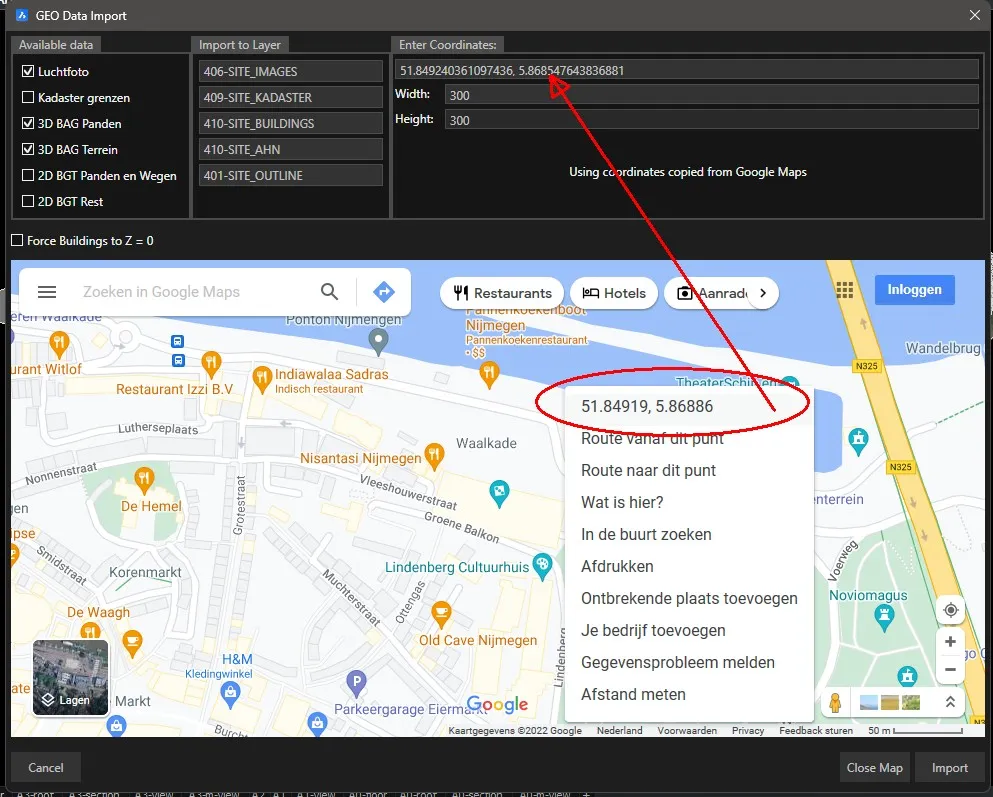
The menu now includes an expandable Google Maps map. Right-click on an area and click on the coordinates to fill them in the menu. With import, the selected map layers are then imported. See the image below for an example.
Custom BGT features now come on separate layers (BGT layer + feature name).
AHN version increased to 2020.
Optimized memory usage.
Renewed URLs.
Issues with scripts in the browser have been resolved.
COUNTLIST :
Pre-selection now works properly.
Sorting is now always based on the selected column in the column settings (SETLIB > Columns).
The total row is now always visible at the bottom, even after sorting.
Faster counting in drawings with many objects not contained in a block.
General speed improvements.
SCADLIB :
When inserting a block in paperspace, it appeared in modelspace coordinates.
Some pages with dummy icons were not loaded correctly or at all.
When searching, not all matching results were always displayed.
LINEARRAY: The linearray menu displays each speaker individually, allowing adjustment of each individual angle.
A linearray can now be edited afterwards: deleting, adding, and adjusting angles is now possible on existing arrays.
DMXINSERT : Blocks are now scaled correctly..
DMXAUTOID : New command for quickly assigning ID’s to a grid of blocks.
DMXAUTOIDCIRCLE : New command for quickly assigning ID’s to blocks in a circle.
MVRExport :
Bug fixed where saving to Dropbox sometimes caused issues.
Rotations are now correctly exported.
MVRImport :
Meshes are now also imported.
MODELCHECK :
Intersecting lines were not always all found.
Inserted arrows are now scaled correctly.
LEGEND : Inserting a legend in paperspace with UCS active in modelspace now works correctly.
RELXREF : Bug fixed where the relative path was not always saved correctly.
ReplaceBlocksGlobal: Blocks were not always added to the correct layer.
Version 8.1
CURVEARRAY:
Bug fix, placing fences on a line sometimes didn’t work correctly when working in millimeters or meters alternately.
Selecting a rotated block gave inaccurate results.
Placing objects along a line in RD coordinates did not always work correctly.
CREATECUSTOMLIBRARY: Creates a library based on a folder structure. A .CSV file is created in, and with the name of, the selected folder.
BESAVE/BECLOSE: The correct document is now activated after closing a block.
Copy: Bug fix with dynamic blocks.
C/CX/CY/CZ: Bug fix, no more REGEN required.
COUNTLIST: If Excel cannot be invoked during Excel export, the XLSX file is directly saved in the drawing’s folder.
COUNTLIST: Bug fix. Importing TXT updated the totals in the menu, but not in the Excel export.
Magnets: Inserting and copying parts with magnets is now (much) faster in large drawings.
RZC: New command that rotates and copies blocks at a specified angle around the block’s grip point.
STPLAN: Now asks for a start number to allow multiple tables to be used in a (main) drawing.
MVRIMPORT: Adjustment to rename invalid block names instead of giving an error message.
SCADLIB: Bug fix. If the menu was hidden during insertion (using the Hide window during insert option) and it reappears, it may not display the most recently used icons (but the top ones).
Version 8
SCBEDIT
The block editor (SCBEDIT) now works without menus when saving the block. BESAVE now has two options, Update and Save. Save saves the block in the drawing where it is opened and closes the block, Update also saves the block but keeps the drawing open. BESAVE does not work if there are open blocks (the Update option does work). Everything must be closed from bottom to top. Or, from the drawing tabs perspective, from right to left.
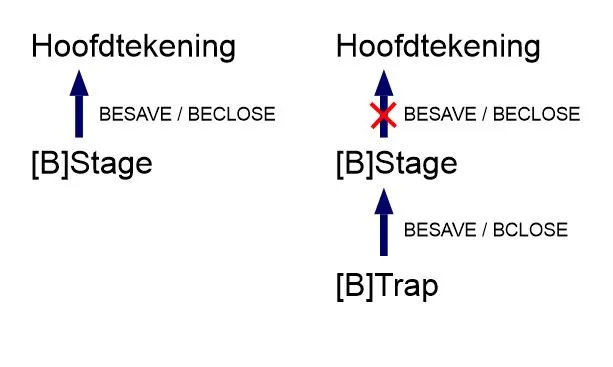
In the above image, it can be seen that the Stage block should not be closed if another block (Trap block in this case) is still open.
GPS:
There are several new commands that help to number and place GPS points:
GPSINSPLplaces the GPS block (GPS.dwg in the support folder) on a polyline and immediately numbers them in the order of the polyline. So, to place GPS points in a drawing, it is sufficient to draw one or more polylines in a convenient loop direction.GPSROUTEConversely, this command calculates the shortest looping route by drawing a polyline along the selected objects. Then useGPSINSPLto place GPS points on it.GPSXYLIST: Creates a CSV file with the XY coordinates and attribute values of the selected block. There is another variantGPSEXPORTin case the GPS device expects a different format.
MVREXPORT / MVRIMPORT: Initial implementation for importing and exporting MVR files.
SCADLIB:
- New ‘Color not in Database’ setting makes the name text of a block not present in the database appear orange.
- Replace block now retains the layer settings.
- When inserting a magnet block, the focus is placed on the drawing screen (and F9 works immediately).
COUNTLIST:
- Sorting of data is now more logical. Texts with numbers are sorted correctly.
- Menu sorting is now included in the export.
- The column name for sorting is now correctly saved and loaded in the next count.
- Legends created with the Legend button now follow the icon settings (Block on or off) and no longer align the text, but follow the table style.
- Blocks with visibility state are now counted correctly as “Block name + Visibility state”.
- When counting more than 1000 blocks, a progress bar is displayed.
- No longer crashes when there is no loaded database.
SCGEO: The following adjustments have been made:
- 3D BAG Terrain: New dataset that imports the Algemene Hoogtekaart Nederland (AHN3) as a mesh. These are large areas, so downloading and importing takes a bit longer.
- Aerial Photos: By default, the most up-to-date, high-resolution photos are now downloaded. These photos are significantly sharper than before.
- 3D BAG Buildings:
- Meshes are now cleaner with fewer triangles.
- Bug fixed when downloading certain areas.
SCALEFROMTO: New command that easily scales an object by specifying source and target lengths.
MZA: New command that moves a selection to an absolute height, relative to the grip point.
FASTXYLIST: New command that quickly creates a CSV file with the XY coordinates of the selected block.
CX / CY / CZ: Copying array objects now retains the array data. Previously, they became standard blocks.
LINEWEIGHTPLOT / TRANSPARENCYPLOT: New commands to set lineweight and transparency plotting settings for all layouts at once.
Matrix Export: Matrix option in Countlist: added checkbox to count deeper than the first layer.
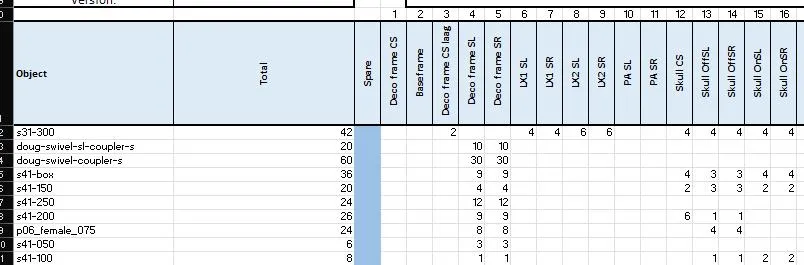
DMX Import/Export:
- Now works when a universe contains letters.
- Added XYZ positions.
SCDIVIDE/SCDISTRIBUTE: Selection order is now the same for both commands.
KABLEN:
- Improved cable length determination method.
- No longer gives an error when entering wrong limits.
SENDALL2DSOLIDTOBACK: Now works recursively.
INFO: Improved build date display.
SCREMOTESUPPORT / RS: SCREMOTESUPPORT has not changed, but there is now a new remote support tool (RS). Just because.
MENU: A new menu is loaded (Scad Re-Event V8.cui). The changes are not too significant. If you have extensively customized the menu and would like to revert to your old menu, you can go back using the MENU command and choose Scad Re-Event V7.cui from the C:\SCAD-REV\Menu directory.
Version 7.0
Version 7.0 · New
Dark Theme: SCAD now has a dark theme, which is enabled by default. With this release the library menu has been redesigned to reflect the dark theme. Other menu’s will be redesigned in the coming releases. To switch back to the light theme, set COLORTHEME to 1.
SCADLIB: The library menu has gotten a complete overhaul to make is more modern and user friendly. The pages to the right of the menu are gone and replaced with sections, and all icons now reorder according to the width of the window. Favorite pages are not yet implemented but are planned to be released in a next release.
Users that don’t like the new window layout can use the command SCADV5 to open the old library menu.
Modelcheck module:
New module that checks for duplicate blocks throughout the drawing. Can be extended with search rules determine the search method (blocks can’t overlap, blocks must overlap, lines cant intersect). This module requires an extended license.
SCIA Export module:
New module that exports an XML file that can be imported in SCIA to calculate forces on structures. This module requires an extended license.
Sections module: New module that automates the creation of section drawings. Insert X, Y and Z section blocks and select a viewport on a layout to fill it with sectioned views. This module requires an extended license.
Add/Replace/Rename: Added new wildcard symbol ‘>’ . This symbol removes all text after the > symbol. (for example -copy> finds -copy1, - copy1000 etc. and replaces that text with the specified new text).
Version 7.0 · Fixed
CURVEARRAY: Blocks no longer need to be rotated to 0 before starting the command.
Security: Files are now downloaded with the more secure HTTPS protocol.
Optimizations: The database is now loaded in background during startup to speed up first time use.
SCUPDATELIB: SCAD will no longer need to close when updating the library.
Bridle: Significant improvement in speed with copying, updating and selecting bridles.
Move/Copy/Insert: Fixed crash on some drawings.
Version 5.3
Version 5.3 · New
COUNTLIST:
Significantly improves count time with large Add-Replace databases.
Added option to only show blocks on one specified layer, wich can be chosen with the dropdownlist in the down left corner of the Countlist menu.
COUNTLIST LEGEND: You can now export directly to a legend with the ‘Legend’ button.
CADBASE: Significantly improved loading time of main and custom databases.
CURVEARRAY: Added warning when more than 1000 objects are about to be created.
SCADLIB:
Added ‘Favorite’ Button. Click + to add and right-click a tab to rename or remove. Middle mouse click also removes the tab.
Added right click context menu on the icons with different options to insert, open or edit their database values.
SCDIVIDE: Added ability to choose two points instead of only a curve.
SCEDITATTRIBUTE: NEW command that shows a popup with all editable attributes to easily edit the values.
COORDINATESTOATT: NEW command that takes the coordinates from a grid made with SCGRID, and adds them to the attribute ‘Coördinaat’. Requires grids made after this update.
ATTEXPORTEXCEL: NEW command that exports all blocks with their attribute values to Excel.
EDITBLKPROP/EDITSUBENTBLKPROP: Checking a parent block checkbox will now check all underlying child checkboxes as well.
NOSELECTXREFS: New command to ignore selection of External References. Similar to NOSELECTLOCKEDLAYERS.
Version 5.3 · Fixed
SCADLIB: Icons were not visible when the database could not be loaded.
CADBASE: Fixed loading of databases with double blocknames with different uppercase characters. Empty or 0 values from custom databases no longer overwrite the main database values.
SCBEDIT:
Fixed error when opening certain blocks that had no blockname defined.
Temporarily removed ability to undo (Ctrl-Z) BESAVE command to prevent the loss of objects in the edited block. Will be further investigated.
**COUNTLIST: **Fixed bug where corrupt blocks could stop countlist entirely. These blocks are now ignored.
Move/Copy: Snap to middle of two points now functions as expected (Previously the clicked point was used). Hovering over a snappoint and then entering coordinates manually would result in the coordinastes being ignored.
SCSHOWALL: Will now execute UNISOLATEOBJECTS as well to improve compatibility with Bricscad Isolate/Hideobjects commands. However, it is recommended to only use SCISOLATE/SCHIDEOBJECTS/SCSHOWALL/SCSHOWALLGLOBAL.
LEGEND:
Fixed dynamic blocks not showing correctly in the table.
Totalling settings from COUNTLIST are now used correctly.
The blockicon is no longer shown under the ‘Symbol’ column, but in a new ‘Icon’ column when the legend is made using COUNTLIST.
Version 5.2
Version 5.2 · New
SCADLIB: Added ‘Favorite’ Button. Click + to add and right-click a tab to rename or remove. Middle mouse click also removes the tab.
RELEASENOTES: New command to show the releasenotes of the newest SCAD Re-Event version.
UPDATEFROMLIB: Added option to rename blocks to new names. Choose a .csv file with ‘OLDNAME;NEWNAME’ to use this feature.
**INSERT: **Added ‘Next point’ option to switch the referencepoint between the insertionpoint and any other points on layer 001-INSERTION found in the block.
SCADLIB / Database:
You can now edit the database values directly per block by clicking with the scrollwheel on the block icon in SCADLIB.
SCUPDATELIB: Added support for a Library version file, removing need for administrator rights to install the library.
CX/Y/Z: You can now type ‘100+120/2’ and get the right distance value calculated from the entered expression.
Version 5.2 · Fixed
COUNTLIST:
Fixed custom database info not showing in certain cases.
Fixed blocks not showing when POST value was undefined in the databse.
Fixed multiplying of values with their count when Total checkbox is checked.
Fixed exporting of blocks not in database to show in correct SYMBOL and Quantity column.
Excel Export: Removed splitting of top row to improve compatibility between Excel installations. Added check for Audit generated blocknames.
Add/Rename/Replace: The order of the rules is now correctly maintained and applied to the countlist. Added option to use two escape characters in Rename rule.
CURVEARRAY: Fixed a bug where too few blocks were created.
Magnets: Fixed inserting blocks with attributes and magnets.
POSTCALC: Added a check for audit generated blocknames. A notification will be shown in the commandline.
Add/Replace: Now the order of the rules as they appear in the csv are honored. You can now use two escape characters (example).
Exportscreen/ExportExcel: Fixed blocknames what were not in the database showing in the right column.
Compatibility: Fixed multiple compatibility issues with Bricscad V19 to prepeare for upcoming release.
SCADLIB: Fixed icon panel not filling the control
ZOOMEXTALLVPORTS: Fixed bug where viewports would be changed to wireframe.
SCADLIBPALETTE: Fixed settings resetting when opening SCADLIB through SCADLIBPALETTE.
CX/Y/Z: Fixed entering value of negative m/cm/mm etc distance values.
Version 5.0
Version 5.0 · New
Magnets:Added magnet functionality, which lets you easily click together blocks to make designing a stage much faster. Magnets have been added to multiple truss blocks since library version 5.6. To use the magnet functionality the following features have been added:
- CM/MM: Copy magnets / Move Magnets. To move or copy an object using its magnets these two commands must be used. During moving/copying of a block you have access to a new commands:
- Next magnet: Cycle between magnets in a block.
- Otherblock: Click a new block to quickly switch the block that is being moved/copied.
- Settings: Opens the magnet settings where you can set the layername on which the magnets are placed, and choose whether the snaps are automatically changed for best compatibility.
Added CXB/CYB/CZB: Same as CX/CY/CZ, only copies the block along its own internal axis.
Added ZOOMSEL, to zoom to selected objects without clearing the selectionset.
Added SIMPLIFYALLSOLIDS to execute DMSIMPLIFY on all solids, including all solids in blocks.
Added SELECTINSIDEPOLYLINE to select all entities that fall inside a polyline.
Added SCSLICE, a slice command that works in any UCS. Set UCS to VIEW to use view direction.
Added BLKIMPORTV2: Same as BLKIMPORT but with the feature to set the distance between objects.
DWG: 2018 files are now supported.
Cleanscreen: Turns off all ui elements to increase the drawing area to the maximum allowed. Use CLEANSCREENON and CLEANSCREENOFF to turn this on or off. Use CLEANSCREENOPTIONS to enable or disable UI elements.
Rollover Tips: When hovering over an entity, it’s options are now editable.
Layoutmanager: Use the button left to the layouts or the command LAYOUTMANAGER to open a dialog where you can add, remove, find or rearrange layouts.
Lock UI: the LOCKUI command locks all toolbars. Pressing Ctrl overrides the lock and allows you to move them temporarily.
Manipulator: With the manipulator widget all entities are easily moved, rotated, mirrored or scaled. When Ctrl is pressed before moving, a copy is made of the selected entity. Set MANIPULATOR to 1 to show it when entities are selected. Set it to 2 to show the manipulator after holding the mouse button for 250 ms. Or use MANIPULATE to show the manipulator on a selected object.
NAVIGATE: With navigate you can walk or fly through the drawing using the WASD or arrow keys. With F you can toggle between flying or walking. Left click to look around, right click to show options. Manipulate the speed and step size with STEPSPERSEC and STEPSIZE.
Face Camera: Select the checkbox in the Drawing Explorer -> Blocks to have the block always face the camera after rotating the view.
ANIPATH: To create a movie from a camera moving along a polyline.
Fields: Added support for fields with Layout Name property. Added NamedObject field category in the Field dialog.
DWGCOMPARE: Use the DwgCompare command to compare a selected drawing with the current drawing during a comparison session. The EndCompare command must be used to exit the comparison session. During a comparison session, New, Modified and Missing entities are displayed using dedicated, user-configurable colors, and their DiffType is displayed in Properties Panel and Rollover Tips, only while the DwgCompare session is active. In the Structure panel all differences are displayed in a dedicated section. Note: default.cst configuration file should be used for optimal result.
VIEW TRANSITIONS: View transitions are now animated, making it easier to keep one’s bearings during view switches.
VTENABLE: Setting that determines whether animated view transitions are enabled for zoom/pan and/or for view rotation operations.
VTDURATION: Setting that determines the duration of view transition animations in milliseconds.
VTFPS: Setting that defines the minimum frame rate required to allow animation. That is 7 by default, which means that the redraw time should take less than 143 (=1000/7) milliseconds. If the computer is not capable to redraw the view fast enough, no animation will be available.
Version 5.0 · Changes
Rewrote SCREMOTESUPPORT, will now download the client when Teamviewer is not found locally.
CURVEARRAY now supports all entity types.
CURVEARRAY will now stop when the next object does not have any room to be placed on the curve.
CURVEARRAY: All entities are now supported.
SETLIB: Now reloads the database after clicking OK.
SETLIB: Added support to multiple Add-Replace databases.
BESAVE: Now makes a backup and shows a warning when a block can’t be saved.
COUNTLIST: Fixed removal of -3Q etc. Now all instances are removed from the blockname, instead of only when the name ends with -3Q.
SCADLIB: Fixed reading of special characters in lcmenu.csv.
SCADLIB and EDITORDER: Now supports unlimited buttons. When adding a new page a button is added automatically.
SCADLIB: Fixed menu showing 26 icons instead of 25 in certain cases.
SCADLIB: Now opens on the last opened page, even between sessions.
SCADLIB: Fixed an error that happened when no database was loaded and the window was closed.
SCADLIB: Fixed error when opening SCADLIB via on_start.lsp.
SCADLIBPALETTE: Will now open the new library menu when a page is selected.
CALCAREA: Now uses the AREAPREC instead of LUPREC.
MAGNETS: Fixed the bug where an object would not be positioned under the cursor when inserting with magnets in a drawing with units other than milllimeters.
Library update window: Removed SCAD releasenotes in the library window.
DIST: The cursor snaps to hovered points when using the DIST command, so you’ll see exact distances while hovering.
ACIS: Upgraded to ACIS modeler version 2018 1.0
MTEX: Numbered and bulleted text is now supported.
Version 4.4
Version 4.4 · Fixed
SCBEDIT: Fixed runtime error.
Version 4.3
Version 4.3 · New
SCADLIB:
There is no longer a limit to the number of page numbers. (used to be 10 max)
Added a folder browser, accessible by clocking the Browser tab.
ixed insert layer. The insert layer may not have updated properly in previous versions.
EDITORDER: Added multiple row selection and moving.
SCALIGN: Added align on Z axis.
SCISOL: Isolate now works with locked layers.
3DDIMENSION: New command that creates a dimension with the true 3D distance.
CURVEARRAY/SCDIVIDE/SCDISTRIBUTE/SCALIGN: Settings are now saved.
SCDIVIDE: You can now enter a custom offset angle, instead of only flipping 180°.
Version 4.3 · Fixed
C/M (Copy/Move): Fixed the unknown error bug. To fix this bug the dotted line was removed from the command.
SETLIB: Fixed default settings value for the library path.
UPDATE: Fixed version registry check.
Installation: Fixed first time startup registry checks.
Version 4.2
Version 4.2 · New
SETLIB: Added a button to force reload the databases.
C/M (Copy/Move): After entering a keyword, pressing space or enter will repeat that last command. When an angle was entered, either through Angle or Difference, the previously entered angle will be added to the current rotation.
RIBBON: Added commands to Model/Views: Projected Views, Detail View, Detail Style, Sectoin Style ans Edit View.
REMOVED COMMANDS: Elen, Telsub, Addvtx, Deldupblk (use Showdupblk or Overkill)
PLINS: Position of new vertex can be selected (same as removed Addvtx command).
PREVIEW: Preview functionality has been added for the PrintAsPdf printer driver. A preview PDF file is generated (in the system Temp folder) and opened with the application registered for viewing PDF files.
VIEW ROTATION CENTER POINT: For real-time view rotation using the mouse, the center point of the view rotation is now derived from the entity found under the cursor instead of using the center point of the viewport. In case no entity is hovered by the cursor, the rotation center point is defined by the center of entities completely inside the viewport.
BACKGROUND: New command that opens the Background dialog and applies the chosen Background settings to the active (model) view.
GUI: When no drawing is loaded, the ribbon, the toolbars and all menus except the File menu are disabled.
Version 4.2 · Fixed
SCBEDIT:
All layers (except Xref layers) are now copied from the main drawing to the block drawing upon opening a block.
Autosaved SCBEDIT drawings (.SV$) will no longer be deleted upon exiting SCAD.
RENAMEBLOCK/RB: Block names are now checked for illegal characters.
FINDBLOCK: When no paths are defined upon opening the menu, a default search path will be used and added.
SCADLIB:
Widened the page buttons allowing for longer page names.
Corrupt library entries in LCMenu.csv are now ignored, so that the rest of the library is loaded normally.
Fixed a bug where page names starting with “LA” would show the line array button. Page names now need to begin with “LA “ (LA + space)
Move/Copy (M/C): Will no longer use the wrong values when OSNAPZ is on.
BLOCKINFO: Fixed bug where BLOCKINFO would stop working after switching to a new drawing.
PUBLISH: Publish in background did crash the program sometimes
Version 4.1
Version 4.1 · New
SETDB: New Command to select the columnnames for the different categories. Added a button to the COUNTLIST screen for easy access. Countlist will go through these columns when searching for specific data.
COUNTLIST:
Fixed counting, now gives same results as postcalc.
Export: Weight and powercolumns now show total weight (was not properly multiplied with count in previous builds)
Export: Blocks are now sorted properly by the Sort Column.
Added checkbox in the column selection to select columns that need to be totalled. When no columns are selected, no total line is printed during export.
FINDBLOCK: Findblock will now search in the entered paths, instead of from an index file. The index file is no longer needed.
C/M: Added a dashed line during copying a block. Entities now snap to their real location during moving/copying
SCADLIB:
Added back the edit order button. Multiselection is not (yet) supported.
Blocks now follow the explode setting in the database. The “Explodeable” checkbox changes accordingly. To overrule, select “Double click to insert” and change (un)select the checkbox after selecting a block, then click “Insert”.
Added “Explode not in DB” checkbox. Blocks that have no entry in the database will follow this explode rule.
When canceling the insert with the Escape key, the SCADLIB window will no longer popup again. To show the window after inserting, cancel with the Enter key.
Right clicking an entry in the treeview will open the path in explorer. Right clicking a block opens the block (instead of inserting).
To rename a page, right click the page button.
Added more detail to the ‘Error parsing menufile’ popup.
Version 4.1 · Known bugs
Install as Administrator: When installing SCAD under a separate administrator account, the user settings are stored in the admin account during installation, which leads to SCAD not loading on start when the application is started under a normal user account. One solution is to elevate a user to administrator and then install SCAD, then demote the user to the appropriate rights.
Missing Xref bug: When opening a drawing with missing Xrefs, the SCAD Re-Event can fail to load. To prevent this, open SCAD Re-Event before opening the drawing.
Version 4.0
Version 4.0 · New
SCADLIB:
The library window has been given a complete overhaul. The biggest (and most requested) change is the ability to leave the library open. To make this work properly, the category selection is now present in the window itself. Those working with a single, lower resolution screen might want to check the checkbox “Hide window during insert”.
Right-clicking the icons will now open the DWG, while left clicking inserts the block.
LCMENU.csv: The menu paths in lcmenu.csv (and custom lcmenus) are now treated as relative paths, when no drive letter is specified. This means that the LCMenu needs to be placed into the root of the (custom) libray (e.g. C:\SCAD-REV\Library\lcmenu.csv).
SETLIB: It is now possible to add an infinite number of custom libraries and databases.
SCINSERT: Added FlipY as keyword to flip the Yscale to -1 or 1.
COUNTLIST: The total line is removed from the Navision export.
SCATTSYNCV2: New command that syncs attributes, even on dynamic blocks (SCATTSYNC will skip dynamic blocks with attributes)
BLOCKINFO: Blockinfo is now a standalone tool palette.
AREA: New command to quickly calculate the area and objects per square unit, and add them to the drawing as Mtext. You can add multiple area’s and substract area’s using closed lines or by selecting the corners of an area.
LAYERPANELOPEN/LAYERPANELCLOSE: A layer panel that can be left open has been added to SCAD and can be used with the commands LAYERPANELOPEN and LAYERPANELCLOSE. These commands will replace LAYERPALETTE.
LAYWALK/LAYWALKISOL: With LAYWALK You can quickly turn on/off different layers, or show them one by one. With LWAYWALKISOL, the entities are isolated depending on if they are drawn on the selected layer.
NOSELECTLOCKEDLAYERS: When activated, this command will prevent the user from selecting entities on locked layers.
3DCOMPARE: New command to compare two drawings with 3D solids and surfaces and highlight differences.
ANIPATH: Quickly record and save a movie by selecting a path for the camera to move along and a point for the camera to look at.
ERASE: You can now erase edges and faces of 3d solids and surfaces.
EXTRUDE/LOFT/SWEEP/REVOLVE: Surface entities can now be created from open and closed curves
Tabbed Dockable Panels: Some panels can now be dropped onto other panels, creating tabs to switch between the panels.
Reset Block: the RESETBLOCK command will reset dynamic blocks to default values.
**XEDGES: **Create LINE, CIRCLE and ARC entities from the edges of 3D solids, surfaces and regions.
EXPORTPDF: Export to PDF is now a separate command.
GRID: The grid lines are now transparent, making them less intrusive.
Visual Style Switch: Switching between visual styles is now much faster.
3DSNAPS: You can now snap to face intersections when 3D Entity snap is turned on (Does not work in the wireframe visual style)
Version 4.0 · Fixed
SHOWMENU/SCADLIB: SCAD 3.6 already had the new library, called with the command SHOWMENU, for testing purposes. The following bugs were found and fixed:
Fixed some rare crashes Fixed loading icons when no menu.txt was found. Fixed unwanted showing of the library window after cancelling insert Fixed inserting a block with a space in its path. Fixed focus unwantedly changing back to the library window, preventing the use of F9 during insert.
SCCURVEARRAY: Fixed command not starting anymore after selecting a maximum/ minimum distance was canceled.
C/C2 & CX/Y/Z: Fixed copying of dynamic block properties. Fixed copying of dynamic blocks with attributes (previously attributes were not copied) Fixed copying of dynamic blocks with different scalefactors.
CURVEARRAY:
Fixed UNDO not working anymore after calling the CURVEARRAY command.
A registry fix is no longer needed to have curvearray behave normally.
BLOCKEDITOR:
You can no longer save a block with BESAVE when REFEDIT is still active.
You can no longer start the blockeditor when REFEDIT is already active.
RXBI: Crash when selection was empty is solved
Version 4.0 · Known bugs
Install as Administrator: When installing SCAD under a separate administrator account, the user settings are stored in the admin account during installation, which leads to SCAD not loading on start when the application is started under a normal user account. One solution is to elevate a user to administrator and then install SCAD, then demote the user to the appropriate rights.
Version 3.5
Version 3.5 · New
SHOWMENU: Test version of a new library window.
SENDALLHATCHTOBACK: Sends all hatches to the back of the drawing order throughout the drawing.
SENDALL2DSOLIDTOBACK: Sends all 2DSolids to the back of the drawing order throughout the drawing.
CALCAREA: Early test version of new command to quickly show the area and people per square unit based on a region or polyline.
LOADAUTOSAVE: New command to quickly open autosaves (.SV$ files).
LEGEND (Paperspace): LEGEND will now ask for a viewport when called in paperspace, and all blocks visible in the viewport are added to the table.
TELDOOR/NUMINC: Reworked teldoor command. Added a graphical window and the option to create new MTEXT.
Bug fixes:
EDITSELECTEDENTITIES/EDITSUBENTITIES:
Fixed Bricscad window going out of focus after selecting a color.
Window Is now modeless.
Fixed highlighting in EDITSUBENTITY.
Added ‘Select Block’ button to quickly change the selection.
SCSHOWALLGLOBAL: Dynamic blocks with multiple visibility states will no longer be affected by this command.
CURVEARRAY: Fixed CURVEARRAY in UCS.
SCDIVIDE: Fixed SCDIVIDE in UCS.
C/CX: Fixed visibility state not correctly set after copying.
C/CX: Dynamic angle property value. No longer adds up when copying dynamic blocks.
SCADLIB INSERT: Disabled redefine on dynamic blocks to prevent them being broken after insert (e.g. changing the angle property would not result in any visual change).
Block Editor: External references are now skipped when saving a block to its parent drawing.
SCALE: Added SCALE command to Ribbon under Edit > Arrange.
****Bricscad
Updated Bricscad to version 16.2.15-1
Version 3.4
Version 3.4 · New
OPENSAVEPATH: Opens the auto save folder.
EDITSUBENTITY: Click an entity to show and edit its layer, color and material properties directly from the main drawing. Hover over an entity to see these properties. Hold shift and move the cursor to view its parent blocks. (Experimental command, use with caution).
EDITSELECTEDENTITIES: Same functionality as EDITSUBENTITY, but multiple entities can be selected by dragging a window. (Experimental command, use with caution). Use checkboxes to alter properties of multiple entities at the same time.
Version 3.4 · Fixed
LEGEND: The legend command has been reworked and optimized: A popup menu will now be shown, with all adjustable settings of the table. You can choose to skip all blocks beginning with a $. The table rows can now be sorted by block name or by drawing order.
Block Editor (SCBEDIT/SCBETITTREE/SCBEDITFAST):
BESAVE: Added a checkbox to save all blocks in the opened block to the previous drawing. This enables the user to save the changes made with REFEDIT, ADDTOBLK, CBIR etc… This may slow down the save process.
All drawings are now saved during the auto save process.
CX/Y/Z MX/Y/Z: Fixed using CTRL-Z during moving/copying.
C/M /C2/M2: Fixed moving and copying in Orth mode.
SCADLIB:
LCMenu.csv no longer needs an empty line at the end of the file for SCADLIB to work correctly.
Fixed error when trying to insert a block with no active documents, showing a message box instead.
Fixed blocks not showing in library menu when drawing ended in .DWG (uppercase)
2PDIST: Fixed crash when cancelling input during the command.
SCREPLACEBLOCKSGLOBAL: Alternative REPLACEGLOBAL command with option to ignore scale, but keep mirrors intact.
Postcalc: Fixed counting of nested objects in XREF’s.
Linearray: Linearray now shows 24 objects instead of 12.
Bricscad:
Version updated to 16.2.09
Version 3.3
SCADLIB: Added reload button to reload the lcmenu.csv, removing the need to restart SCAD Re-Event.
Legend: Blocks with visual errors no longer break the command, but are now skipped. The information is shown in the legend (name, description, number), but the blocks are not visible. Names of the blocks with errors are shown in the editor. You can now skip the count collumn.
SCADLIB: Optmized library iconmenu. Menu interface is now much faster, especially with large blocks.
SCDIVIDE: Added ability to choose a custom refpoint when a blockreference is selected.
SCUPDATE: Added ‘What’s new?’ button which shows the changelog.
M/C(Move/Copy): When moving/copying solids, the reference point would always be the origin (0,0) when default reference (LowerLeft) was used.
SCUPDATE: Fixed the tekst displayed in the ‘new update available’ notification window.
SCBEDITTREE/SCBEDITFAST: Fixed blocks staying highlighted after clicking cancel in the tree window.
LOFTX/SWEEPX/EXTRUDEX: Commands were unusable and would stop after choosing ‘Solid’ or ‘Surface’.
C(X/Y/Z)/M(X/Y/Z): Fixed user input. Distance to move must now always be typed with a dot as a decimal seperator.
Version 3.2
Rename Block(RB): Fixed renaming of dynamic blocks
SCUpdate: Changed progressbar tekst to “Downloading Update”.
SCCURVEARRAY: Fixed curvearray not starting after canceling during curve selection.
SCBLOCKTREE: Added automatic scrolling when dragging a node.
CX/CY/CZ: Fixed commands not working anymore after updating.
Version 3.1
SCADLIB Blockinfo: Only blocks that were in a previous selection are now highlighted.
Fixed highlighting of blocks ending in -3q
CURVEARRAY: You can no longer start curvearray again when it is already running. If curvearray won’t start anymore, even after closing the window, try SCCURVEARRAYRESET.
Fixed several bugs that were occurring due to the fix that one block can be used multiple times for several arrays (mostly data that wasn’t reset) .
SCBLOCKTREE: XREF’s are now displayed with their name greyed out
CX/Y/Z, MX/Y/Z: Reversed the order in which the copies are made, so that the original order is kept. (wipeouts now stay over entities).
SCALIGN: When aligning blocks with midpoint selected, the referencepoint is used
SCUPDATECHECK: Fixed text not displaying properly in the popupwindow with incremental updates.
SCTOOLS.DLL: Combined Rescale.dll, Delatt.dll into one dll. Re-added convertunits (not available in 3.0)
SCADLIB: Fixed values shown with ‘Calculate’ in the ‘block info’ tab. Previously clicking the post would show double values.
Update Check: Fixed ‘remind me later’ not working properly.
Block Editor: New command SCBEDITTREE: Shows nested blocks of selected block in a treeview. Compatible with blockeditor.
New command SCBEDITFAST: When 1 block is selected it will be opened immediately. When more blocks are selected the blocktree is shown.
CX/Y/Z & MX/Y/Z: When ’-’ character is entered, the distance becomes the previous distance multiplied by -1. ‘E’ , ‘0’ and ‘Extents’ can now be used for positive extents, and ‘N’ , ‘NegExtents’ or ‘-0’ can now be used for negative extents. MZ only: You can now enter ‘A’ For absolute distance. Type ‘R’ to go back to relative. You can now quickly switch between X, Y and Z axis by typing X, Y or Z.
CurveArray: Added ‘Pick’ Button to enter or select an angle via built in GetAngle.
ISOL, SHOWALL and SHOWPREV are remapped to the correct commands.
SCDIVIDE: You can now divide an entity on a curve based on how many copies you want, or what the minimal distance between copies should be (and the number is calculated automatically).
Version 3.0
Version 3.0 · New
SELSIMLINES: Selects all lines that are similar to the one that is picked by the user. Similarity is checked by line area and/or distance. Can be found under Select - Select on the Ribbon.
SELBLKATT: Select all blocks with similar attributes. Blocks can be filtered by attribute keys. Can be found under Select - Select on the Ribbon.
SCFINDBLOCK: Find and highlight all blocks with an exact or partial match with the specified name. Blocks in blocks are also found. To unhighlight the blocks, use the REGEN command. Can be found under Block/Group – Blocks on the ribbon.
CXFAST/CYFAST//CXFASTNEG/CYFASTNEG/SETCXY: CXFAST, CXFASTNEG, CYFAST and CYFASTNEG are mapped under ctrl + arrowkeys and will copy the selected item over a set distance. The first time the command is started after installation of the new update it will ask to enter this distance (default 2072). The distance can then be changed with the SETCXY command. The distance must be set in mm, but will be translated to the insert units when copying. Can be found under SCAD Tools – Scaffolding on the ribbon.
SCDISTRIBUTE: Distributes the selected objects on a line between two user chosen points. The distance between the insertionpoints of the blocks (or centerpoints for entities) is equal, unless “equal distance between objects” is checked.
Rotate entities: Rotates the entities to the same angle as the (imaginary) line between the two points.
Equal distance between objects: The distance between the X or Y extents of the objects is kept equal.
Offset: Custom distance offset at beginning and/or end of line.
Can be found under Edit - Arrange on the ribbon.
SCALIGN: Align objects according to their extents (or midpoint) along the X or Y axis.
Can be found under Edit - Arrange on the ribbon.
SCBOXMODE: Changes the rendering of all blocks to simple cubes. When a selection is made, the blocks inside the selection are not affected and will be rendered normally.
Can be found under View – View on the ribbon.
SCBLOCKTREE: When no selection is made, SCBLOCKTREE shows all Block definitions. When a selection is made, SCBLOCKTREE will show all block references. When a selection is made prior to entering the command, the following options are available:
Drag and drop with left mouse button: Moves the block to another block.
Drag and drop with right mouse button: Copies the block to another block.
‘Delete’ key: Deletes the selected block.
Moving and copying the block to other blocks may affect its position in the drawing as the internal position of the block is used in the new block. Can be found under Block / Group – Blocks on the ribbon.
LAYERPALETTE: Show a palette with all layers and layer states. WARNING: Changes made to the layers via the conventional layer dropdown list are not affected in the palette, unless the palette is refreshed by calling the command again!
Clicking the name of a layer will make it active. Double click the name of layer to edit its name. Click the “New” button to create a new layer.
Can be found under Home – Layers on the ribbon.
LEGEND: Adds a legend with all selected blocks and their information from the database. Can be found under Block / Group – Blocks on the ribbon.
SETSCISOM: Sets horizontal and vertical angle for SCISOM command (page down). Can be found under View – View on the ribbon.
LAYERTOCOLOR: Sets the color of all entities with color ‘Bylayer’ to the real color of the layer. Found under Home – Layers on the ribbon.
3DF2PL (3d Face to Polyline): Converts a 3D face to a polyline based on its circumference. Found under Draw > Modify.
SCINSERTDWG: Inserts and redefines a block with the selected DWG file.
UPDATEFROMDWG: Redefines all blocks in the current drawing with a second drawing.
SCDELLATT: Removes all attributes from all blocks in the drawing.
SCTOBTOF: Sets all entities of the selected type to back or to front.
SCGRID: Tool for creating a grid.
SCUPDATE: Checks the updateserver if there is a newer version of SCAD Re-Event available for download.
SCUPDATECHECK: Checks the updateserver on startup if there is a newer version of SCAD Re-Event available for download.
Version 3.0 · Fixed
RENAMEBLOCK/RB: Renameblock is now case sensitive.
CX/CY/CZ MX/MY/MZ: Entering 0 as distance will use the entity’s geometric extents.
SCADLIB:
A custom database can now be used alongside the main database.
Added checkbox for inserting into the current layer, overriding the CADBASE defined layer.
Blocks will now show their insert color while inserting/attached to the cursor.
LEGEND: Added a standard blockcount column.
SELECT: All selection commands (Found under Select – Select on the ribbon) can now be used during other commands, and will no longer cancel the current active command. This may not work during every command, but M(ove), C(opy), MX/Y/Z, CX/Y/Z and RX/Y/Z are supported.
Interface:
All new commands added to the ribbon.
Updated ISOLATE, SHOWALL, and SHOW PREVIOUS buttons in Block/Group – Group on the ribbon to use the correct commands.
Added Background Grey button
Renamed “Object Align” to “Dynamic align on curve”
Added new Solid editing commands to ribbon.
Added 2 Quick Hatch commands to quickly create a solid hatch. Found under Draw > Quick Hatch (click the arrow/text to expand) > Hatch entity / Hatch Point.
Added the following commands to the drop-down menu’s:
Modify > Array > Patharray
Modify > Array > RectArray
Modify > Array > PolarArray
Modify > Array > EditArray
3D > Direct modeling > Stitch
3D > Direct Modeling > Extrude Surface
3D > Direct Modeling > Revolve Surface
3D > Direct Modeling > Deform > Move Point
3D > Direct Modeling > Deform > Move Edge
3D > Direct Modeling > Deform > Transform Curve
3D > 3D Solids > Polysolid
3D > Smart Selection > Same Radius Protrusions
3D > Smart Selection > Same or Less Radius Fillets
3D > Smart Selection > Same Radius Fillets
3D > Smart Selection > Same Area Faces
3D > Smart Selection > Edges
3D > Smart Selection > Same Length Edges
3D > Smart Selection > Face Loop
View > Generate Views > Projected Views
View > Generate Views > Section Style
View > Generate Views > Detail Style
View > Generate Views > Edit View
View > Ribbon Bar
Insert/Blocks > Geographic Location
Insert/Blocks > Map Connect
ettings > Layers > Move to Current Layer
Settings > Layers > Layer Previous
Tools > Drawing Explorer > Multileader Styles
Tools > Drawing Explorer > Multiline Styles
Tools > Drawing Explorer > Render presets
Tools > Drawing Explorer > Folders
Tools > Hide/Show > Hide Entities
Tools > Hide/Show > Isolate Entities
Tools > Hide/Show > Show Entities
Tools > Attributes > Redefine Attribute Block
Tools > Attributes > Synchronize Attributes
Tools > Attributes > Block Attribute Manager
Tools > Data Extraction
Tools > Create Block
Tools > Save Block
Dimension > Edit Multileader
Dimension > Multileader add leaders
Dimension > Multileader remove leaders
Parametric > 3D Constraints > Rigid Set
Version 3.0 · Fixed
POSTCALC: Optimized code, is now much faster (most noticeable on bigger drawings).
SCADLIB:
Will now work correctly even when one menufile is corrupt or not correctly formatted.
BLOCKINFO TAB: Values shown in blockinfo are now correctly formatted on computers with a comma as a decimal separator.
CALCULATE (BLCOKINFO TAB): When no blocks are found within the database no values are shown (instead of an empty list).
“Last” button will now correctly show the last page and tab. Keep in mind that these are only saved when a block is inserted.
Truecolors (RGB values) are now supported when inserting from SCADLIB.
SELALL (Ctrl-A): SELALL now only selects the objects on the active layout.
SCBEDIT:
Editing block with an asterisk (*) in their name cannot be saved with BESAVE, and are therefore no longer accessible with the block editor.
Clicking on a dimension would pop up the container window, but when the dimension was chosen the command would result in a “layer is locked” error. Dimensions are now ignored by the blockeditor as these are not editable blocks.
Some Autocad blocks would become dynamic when inserted and were therefore uneditable with the blockeditor. Opening dynamic blocks is now supported, however the dynamic block settings of real dynamic blocks will probably be lost. Use with caution.
LOFTX: Fixed bug where LOFTX couldn’t be used more than once, except when REGEN was called.
C2/M2 (C/M, Move Copy): Sometimes when moving/copying objects the default draggingpoint was not the refpoint of the block. Sometimes the object would snap to the snappoint, regardless of which coordinates are typed in by the user. Reverted copying/moving of locked entities. Entities on locked layers are now ignored. When undoing changes made by C2 the copies will now be undone one by one, instead of all copies made at the same time.
CX/Y/Z MX/Y/Z: Values for X, Y and Z are now remembered separately.
SCBEDIT (BLOCKEDITOR): Fixed rare exception that would happen when using BESAVE for the first time on a new installation.
STACKOVERFLOW: Fixed the stackoverflow bug that would occur when using SCAD Re-Event for an extended period.
CONVSEG: Removed display of coordinates in the editor.
RX/RX/RZ: Default rotation angle is now 90° instead of 0°.
CURVEARRAY: Fixed disappearing array when the same block is used to create 2 or more arrays.
Other fixes/additions:
Added an automatic update check that checks for a newer version of SCAD Re-Event on startup. When an update is found, a message will be displayed every time on startup until SCAD is updated. When ‘Remind me Later’ is clicked, the message will be suppressed for 30 days.
Known issues:
.Net 4.6: Several commands will not work properly when .Net 4.6 is installed. A fix is available and is applied during installation of SCAD Re-Event V3. Decimal separator needs to be set to a dot in Windows language settings.
Removed commands:
C2072: C2072 used a fixed distance of 2072. To do this with V3.0 use SETCXY to set the distance to 2072 and use CXFAST/CYFAST, or ctrl + arrow keys to move/copy the entities.
Old releases
Ver 2.41
POSTCALC: Bugfix, optimized (much faster on big drawings)
SCADLIB: Bugfix for corrupted menu files and better international settings handling
BLOCKINFO: International settings bug fixes
SCUPDATE: Rewritten, quits SCAD before updating
RB (RENAMEBLOCK): Rewritten
SCDISTRIBUTE: New command
SCALIGN: New command
SELALL (Ctrl – A): Bugfix
MX,MY,MZ,CX,CY,CZ: Rewritten, distance 0 is extents
Ver 2.4
SCDELATT: Deletes all attributes in drawing (ATTDEL removes from selected blocks)
REPLACEBLKS: Bugfix, top block was not replaced when nested blocks existed.
SELALL: Bugfix
SCADLIB: Block Info tab added. Menu file can be Excel file.
L2L: Layer to Layer command. Moves all layers to a newly created layer.
PL3D2D: Flattens 3D polylines to 2D polylines
SCADLIB: Bugfix (stack overflow)
LEGEND: Ignores Xrefs
SCISOL: Replaces ISOL, isolates objects, works with SCSHOWPREV (unlike ISOLATEOBJECTS).
SCHIDEOBJECTS: Hides selection, works with SCSHOWPREV (unlike HIDEOBJECTS).
SCSHOWPREV: Replaces SHOWPREV, shows previous Isolate State.
SCSHOWALL: Shows all objects (unhides all objects), ignores hidden objects in blocks
SCSHOWALLGLOBAL: Unhides all objects, even when nested.
SCBEDIT: Close with drawing tab warning changed
REPLACEGLOBAL: Bugfix
Ver 2.3
SCADLIB: Changed to toolpalette, bugfix with Block Editor fixed
SETTRANS: Set transparency of object (hatch) to default value
CURVEARRAY: Path begin and end option added
Ver 2.2
BESAVE: Optimized for faster returning to parent drawing/block
REVERSECURVE: Reverse direction of a line, polyline or curve
STPLAN: Bugfixes, layers of wipeout now correct, uses STPLAN tablestyle, database setting in SETLIB
ATTDEL: Removes attributes of selected blocks in drawing
SCATTSYNC: Bugfix
LEGEND: Creates a legend from selected blocks with blockname and/or description from current database
CURVEARRAY: New path array tool.
2PTDIST: Tool for entering positions in a map after measuring distances to known objects.
SETLIB: Database for STPLAN added.
3DF2L: New command to convert 3D Faces to lines.
CONVERTUNITS: Convert a DWG to another unit
Ver 2.1
SCBEDIT, BESAVE, BECLOSE: Edit block in new document
PLLINE: Change arc segment of polyline to line
PLCURVE: Change line segment to arc.
Ver 2.0
Ribbon interface: New ribbon interface in workspace SCAD Re-Event
REPLACE: Asks for Scale
GROUPSEL: Toggles ability to select a group.
LINEARRAY: Uses correct DWG’s from Iconmenu page 2 and up.
SCATTSYNC: Syncs attributes of all blocks.
MOVE, COPY: Fix for default refpoint in UCS
EDITBLOCKPROP: Edit properties of blocks or inserts.
REPLACELST: Replaces blocks defined in replaceblks.csv in Database folder
UPDATEFROMLIB: Replaces all blocks with current blocks in Library. Uses indexlist from FINDBLOCK.
POSTCALC: Bugfix calculating nested blocks when top block was in database.
SECTION: Bug fix.
INSERTLIB: Rewritten, bugfixes.
SETLIB: Bugfix saving Customer Menu.
TEXTGENERATOR: Bugfix
ARRAYBP: New command Array Between Points
Ver 1.8
SCSECTION: To set section display by two points
SCSECTIONOFF: Switch off section for current viewport
SCBSECTION: Sets section by two points in block “SCAD-Section”
SELSIMBLKS: Selects all blocks with similar name to two blocks selected by user
SELSIMBLKN: Selects all blocks with same name as selected block, N characters are compared
SCSELECT: Better SELECT command
SELBLK, SELBLKS : Improved selection with dynamic blocks
LAYERTOCOLOR: Converts the color of objects from bylayer to the color of the layer.
CAC: Distance by two points fixed
Ver 1.7
POSTCALC: Can open Excel files, use SETLIB to setup database.
POSTCALC: Can export results directly into Excel.
TEXTGENERATOR: Bugfixes
SHOWMENU2D: Blocks can be set non explodable
Ver 1.6
POSTCALC: Uses aditional database for adding/replacing items.
SCINSERT: Bugfix, in Acad inserted blocks were unitless
SELECTSIMILAR: Added to toolbar Select and PullDown menu.
CRB: Copy Block Rotate, copies block with default angle 0
BLKIMPORT: Bugfix when cancelled
Ver 1.52
SCREMOTESUPPORT: Starts Teamviewer Quick Support.
Ver 1.51
SHOWMENU2D: Preview can be switched off.
Ver 1.5
MX/MY/MZ: No selection between moves, enter is next distance
SHOWMENU2D: Selecting item in list will show corresponding page. Empty blocknames possible by adding dummies in the list for outlining blocks. Custom fields can be selected. Bugfix for inserting in frozen/off layers. Preview added in BC.
CNTSEAT: Blockname has to be start with “SCADSEAT,” i.e. “SCADSEAT-red” is valid.
LINEARRAY: Block was unitless
OA: distance can entered with “m” or “mm” suffix for unit
CAC: distance can entered with “m” or “mm” suffix for unit
FINDBLOCK: bugfix search in DB
POSTCALC: Export txt and csv separated
REPLACE: Scale option removed
Code optimized
Ver 1.45
M/M2 (Move), C/C2 (Copy): Reference point options added
PURGEB5: Purges all blocks 5 times to purge nested blocks.
POSTCALC: Bugfix when using “,” as separator. Counts no nested block when parent block is in database.
FIND: Bugfix, doubleclick on list will insert block
XYCOORDATT: Bugfix, meters or mm
XYCOORDBLK: Bugfix, new sort, new layout, Meter or mm
LINEARRAY: Grid angle added, bugfixes, new icon order
SHOWMENU2D: LA button only visible when pagename starts with “LA”
Ver 1.44
SCADLIB: Bugfix on close
TEXTGENERATOR: New command, beta.
CR: Bugfix, command executes once instead of loop.
SCUPDATE: Checks update on internet and installs it when requested.
INFO: Shows changelog
WRITESERIAL: Obsolete, licensing via dongle and serial no longer needed (but still possible).
SCCHANGELOG: Shows latest changes (internet required)
Buxfix: Error on start with doubleclick DWG in Explorer fixed
Ver 1.43
POSTCALC: TXT export added.
SHOWMENU2D: Bugfix, layer 0 returned error in Acad.
Ver 1.42
Tapijt: Bugfixes
XYCOORD: Renamed to XCOORDATT
XYCOORDATT: Old XYCOORD
XYCOORDBLK: Creates XY table based on selected blocks
DELHATCH: Deletes all hatch objects in blocks.
CB: Menu added
BLKSCALE1000: Scales all blocks x 1000
ROTDYN: Speed improvement
Ver 1.41
STPLAN: Order of parts on same z improved
SHOWDUPBLK: Better algorithm for finding duplicates
UPDATEFROMLIB: Updates all block with the block with the block found in the library
UPDATEFROMDWG: Was INSERTLIB
BLKSCALE1000: scales all blocks with scale 1000 to 1
BLK2MM: sets mm to unit of all blocks
BLK2M: sets meter to unit of all blocks
Ver 1.4
ROTDYN: Rotates dynamically objects in 2D to make them “look at” the cursor.
REPLACEGLOBAL: Replaces all instances of a block, even when nested.
XYCOORD: Creates XY table or file based on Block “CROSS” with attribute “NAME”.
SHOWMENU2D: Did not use layer defined in SCADLIB CSV file, regression from 1.38. Width pagenames extended. DWGList on the right can browse subfolders.
LASTLIB: New commando shows last folder with SHOWMENU
Demo version available
Uses BC V14 as platform.
Ver 1.38
Bugfix
Clean up UI
Ver 1.37
STPLAN: Undo does undo the whole command instead of single objects
SHOWMENU2D: Shows multiple folders if correctly setup in CSV, replace function, uses new insert command (SCINSERT).
SCINSERT: can rotate inserts before placing
M2: can rotate selection before placing
C2: as M2
REPLACE: Replaces also nested blocks
SETLIB: bugfixes
SNDF: Exports beam endpoint freedom as set in CSV
SCADLIB: Bugfix, error when closing BC
BLCOPYBASE: New commando (Acad only), copies block with insertionpoint in COPYBASE, paste with ctrl-V
TAPIJT: new command for carpet at exhibitions
KAMER: new command related to TAPIJT
SCMIRROR: Mirrors blocks and rotates all blocks after mirroring 180 degrees around local Y-axis.
Ver 1.36
GATTE: Global Attribute Edit. Updates also attributes of blocks on paperspace
UPATT: Global Update Attribute. Updates also attributes of blocks on paperspace
SETLIB: Sets location of CSV file for menu and database
SCADLIB: Can display two CSV Libraries
Ver 1.35
STPLAN: Creates wipe, control text in first line of CSV
OM: Selects only visible objects
ISOL/EGRP: Invisible objects are locked
SDNF: Removes export lines.
SHOWDUPBLK: Selects duplicate blocks
PREC: Removed
PLTOREC: Removed
RECTOPL: Removed
POSTCALC: Error with anonymous blocks solved
MM2M: converts mm drawings to Meter (nested objects are also converted) Experimental, use with caution
M2MM: converts Meter drawings to mm (nested objects are also converted) Experimental, use with caution
SHOWMENU2D: uses layer column to insert blocks
REPLACE: Did not copy SCALE from original object
Ver 1.34
POSTCALC: Bugfix: no correct file written when export, regression from 1.32.
SCKEY: Check for SCAD dongle updated and steamlined.
Ver 1.33
CBI/CBIR: Bugfix
Ver 1.32
RXBI/RYBI/RZBI: Rotates blocks around the local XYZ axes of the block.
RXB/RYB/RZB: Bug fix: Rotates around current UCS
POSTCALC: Bugfixes, added POST option
SHOWPREV: Shows previous ISOL or GROUP selection, groups are updated when objects are added or removed
SDNF: Export lines on specific layer to SDNF format for FEA calculations
Ver 1.31
New installer.
Uses SCAD dongle
Ver 1.3
REPLACE: Keep original layer and color option added.
SELBLK: Selects only objects that are visible, so can be used with ISOL.
PREC: Creates Polyline rectangle which will stay a rectangle when moving a grip point
PLTOREC: Convert a polyline to a rectangle as with PREC
RECTOPL: Converts a rectangle to polyline.
Ver 1.2
POSTCALC: Sort bug on “Blocks not in database” view solved. 3x Enter proceeds to results.
SCISOM: Changes to Isom view, keeping selection active
SCPLAN: Changes to Plan, keeping selection active
SCPVIEW: Enter camera and target position to create perspective. Target Z fixed on camera Z
SC4V: Creates 4 named views “PLAN”, “FRONT”, “RIGHT”.
REPLACE: Did not use 3D rotation of original object
LINEARRAY: Command to create custom line arrays.
SHOWMENU2D: Shows “LA” button for Linearrays
Ver 1.1
01-04-2013
BC V13 compatibility added
SHOWMENU2D: Insert multiple in BC.
XPRISM: New sweep command
DELDUPBLK: Deletes duplicate blocks. Identical blocks on identical position, but on different layer are considered duplicated and one will be deleted.
Ver 1.09
RX/RY/RX: Undo marker set for every rotate
GEOM: Select active block if available, shows item name
INSERTLIB: Replaces blocks by blocks listed in REPLACEBLK.CSV
SHOWMENU2D/FINDBLOCK: No preview with zoom/rotate of selected block because of stability issues
SHOWMENU2D: Insert changed to multpile
POSTCALC: Bugfixes
X2072/Y2072/ X-2072/Y-2072/Z2000: Copies selected objects directly in “Layher grid”
STPLAN: Text is placed on center position
CONVSEG: Converts a Circle, Ellipse or Polyline to segmented polyline
NUMINC/STEAL: Removed, download from www.lee-mac.com/lisp/NumIncV3-3.lsp and www.lee-mac.com/lisp/StealV1-8.lsp
Ver 1.08
MX/MY/MZ/CX/CY/CZ/RXB/RYB/RXB: Undo marker set for every copy/move/rotate
EGRP: Edit Group. Isolates GROUP for editing
MGRP: Make Group. Creates GROUP of selection
DGRP: Delete Group. Explodes selected GROUP
EBLK: Edit Block. All other objects are hidden and UCS is changed according block.
ENBLKD: End edit block, discard changes
ENBLKS: End edit block, save changes
ISOL: Isolates selected objects
SHOWALL: Shows all objects, ends GROUP editing, BLOCK editing or ISOL
RXB/RYB/RZB//RX/RY/RZ/RBCLEAN: Works in Block Editor and repeats until Esc.
SELALL: Selects all objects, but no invisible objects. Use this with “in group/block” edit commands.
ADVTX/DELVTX: Add or delete vertex in polyline
RX90/RY90: No longer available
Ver 1.07
SCADLIB: bugfix rightclick on folders with full path name.
FINDBLOCK: Focus after start on input field
STPLAN: Groups same setup of Layher components. Use STAANDER.CSV to define valid objects
Ver 1.06
CNTSEAT: Double click on grid does select the listed seats, no other matches are select.
FINDSEAT: Optionlist added for searching values in one attribute.
INCSEAT: Can decrease values too.
REPLACE: Selection of source block and “to be replaced” reversed.
ADDTOBLK: Add objects to block without editing the block
CC: Like CX/CY but copies objects in any direction
XABLOCK: Removed
DARRAY: Optimized
PLJ: Polyline Join. Attempts to join/convert selected lines, arcs, polylines into single polyline
ZS: Removed from Acad. Margin removed (did zoom twice).
All modules: Less global vars, some translation and bugfixes.
Ver 1.05
SETRANG: Sets rang for SCADSEAT and colors according fixed colortable.
CNTSEAT: Does no longer color the KILLS (colors are set by SETRANG).
STPLAN: Creates a table with summary of used Layher parts on same XY pos.
POSTCALC: Bugfix, did not count blocks with just subitems starting with “$”. Regression from 1.04.
SCADLIB: LAST button opens SHOWMENU with last page. Last also works in new drawing where no menu was opened yet.
SHOWMENU: Bug fix block index in preview and data. Mirror XYZ option added.
REPLACE: Rewritten, should manage INSUNITS correctly. Does not copy the SCALE of replaced block anymore.
LAAGINFO: Renamed to LAYINFO.
LAYINFO: Was LAAGINFO. Colors changed.
Ver 1.04
INVLAYF/INVLAYO: Replaces INVLAY. INVLAYF is inverting the Freeze option and INVLAYO the On/Off option of all layers.
CALWEIGHT: obsolete, use POSTCALC to calculate totals.
OM: Only objects in current layout or modelspace will be selected.
MX,MY,MZ,CX,CY,CZ: Possible to enter m, c, cm as suffix which will calculate the distance in meter or centimeter, i.E. “2m” will be 2000 when INSUNITS is mm(4). Works only when UNSUNITS is mm or m (4 or 6). Last objects will be Previous selection. Obeys UCS.
ADDTOBLK: adds objects to a block
REMFROMBLK: removes a sub object of a block, not detach but actually remove (delete) the object. No save Undo.
POSTCALC: Toplevel option removed. Asks for selection or (default) all blocks. Works with xrefs (prefix removed). Fixed double appearance of blocks when mixed 2D and 3D blocks are used. Xref nesting not supported in BC yet. Weight and Power cells are now totals (value times quantity), totals added of both columns. Quantity column can be moved to desired place.
Ver 1.03
ALONG: bug fix
SCADLIB: FIND button added, calls FINDBLOCK
FINDBLOCK: displays data from database and option to search in database added
Ver 1.02
31-10-2012
FINDBLOCK: Finds any block in the Re-Event (sub) folder. With Preview and Insert.
C3D2D: Changes block appearance to 2D, 3D, Front view or wire.
SCX/SCY/SCZ: New commands, like SCALEXY, does not work correctly with solids
COPYFACE: creates copy of a face of a solid which can be extruded afterwards.
MR / CR:
INVLAY: New command: Inverts layer on/off
Multiple bugs fixed, faster load.
Ver 1.01
11-10-2012
SNAPS: Experimental command. Snap menu like SCAD, do not close this when multiple documents are open because this will cause errors when switching to another drawing. (open and close SNAP menu will stop the errors).
POSTCALC: Toplevel block count added
MX,MY,MZ,CX,CY,CZ: distance can be either two points or entered by keyboard. Negative distance repected.
SHOWMENU (icons): Page number can be edited to names, bak file created for restoring order, dwglist can be hidden, bugfixes for inserting blocks
SCADLIB: Right click on menu file opens assigned folder in Windows
CALCWEIGHT: Shows total in menu instead of commandline
RZB: error fixed
PLINS: error when nothing selected fixed
RBLEAN: undo werkt beter
SHOWMENU: Insert aligned option added
Ver 1.0
First release